Open a chest. Add one.
Keep the tracker on your phone or second screen. Tap the big button after each opening, or add a batch after a match. Space works when this page has focus.
Keep your count. Stay in the game.
A free, manual chest tracker with saved sessions and Pirate Token odds.
 Your chest count
Earlier entries keep their rate. About rates ↗
Manual counting · Your game account stays disconnected.
0 total chests across 1 sessions
Your first session is ready. Start with the counter above.
A companion for your next chest run.
Keep the tracker on your phone or second screen. Tap the big button after each opening, or add a batch after a match. Space works when this page has focus.
New session gives you a fresh count without losing previous sessions. Made a mistake? Undo it, subtract one, or edit both rate counts.
Your browser remembers the log. Export a backup and restore it on another device. No account, install or paid plan required.
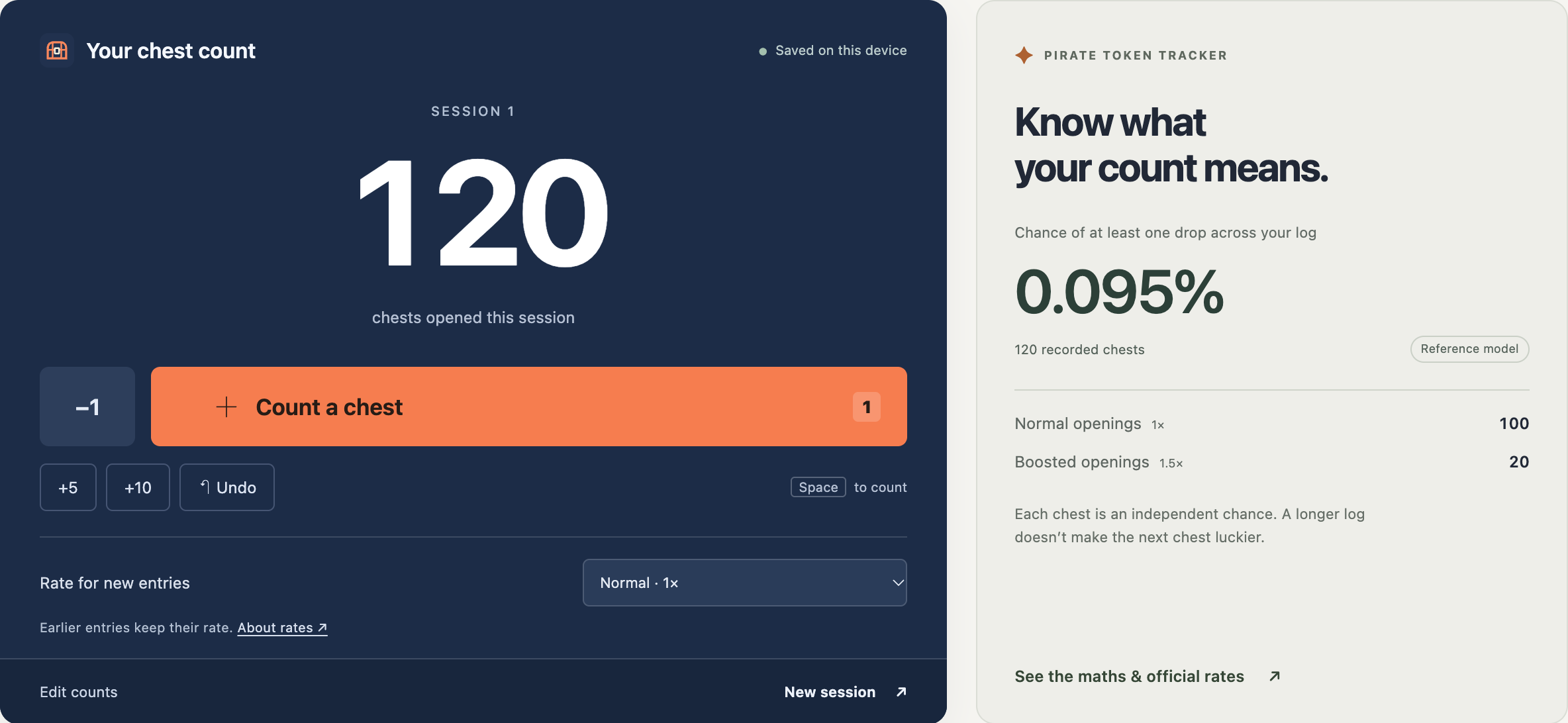
For Treasure Hunters, this tracker uses the published Pirate Shop Access rate as a reference. Record only eligible openings made before you receive that reward.
Epic lists 1 in 137,500 for normal matches and a 1.5× Pirate Shop Access multiplier for Treasure Hours. Special events can use a different multiplier. Check the current official rules ↗ before selecting a rate.
We calculate the chance of at least one drop across your recorded attempts, assuming independent openings at the stated rates.
1 − (1 − p)n × (1 − 1.5p)b
Switching the rate never rewrites older entries. The percentage is theoretical; it does not measure progress toward a guaranteed reward or increase your next-chest odds.
Rates checked November 15, 2026 · Epic Games · VGC report
Count on your phone while playing on PS5 or Xbox. Use the same page on a desktop or second screen. Buttons are made for tapping; no connection to the console is needed.
The total grows from your own entries. Name the log for your season and keep separate sessions for each run. It cannot retrieve openings you have not recorded.
Use a chest map to plan locations. For an in-game overlay or automatic detection, look for a dedicated tool and verify its platform support and permissions. This counter stays manual.
Yes. Manual counting, saved sessions, the odds estimate, and backup export and import are free. There is no account or subscription. A saved log can hold up to 1,000 sessions and 100 million chests.
Counting is manual. Tap +1 after opening a chest, use +5 or +10 after a match, or press Space while this page is focused. The tool cannot detect gameplay, connect to your Epic account, or count while the game has keyboard focus.
Your log saves in this browser on this device when browser storage is available. Refreshing or reopening the same website keeps it. Private browsing, clearing site data, or changing browser can remove or separate your log. Export a JSON backup and use Restore backup to move it to another device. There is no cloud sync.
Yes. Keep this page open in a current mobile browser and tap +1 after each chest you open on PS5, Xbox, or PC. You do the counting; the phone does not connect to the console. The large buttons work without a keyboard or download.
No. My Chest Counter does not ask for an Epic Games login, password, or access token. Counting data stays in your browser unless you choose to export it.
Yes. You can manually log eligible chests and estimate the chance of at least one Pirate Shop Access drop, often called the Pirate Token. The reference model uses Epic’s published normal-match rate of 1 in 137,500 and an optional 1.5× Treasure Hours rate. Check the current event rules before choosing a rate. This page does not detect live events or special multipliers.
No. Under the independent-attempt model, previous misses do not increase the next chest’s chance. The displayed percentage describes at least one success across the attempts in your log. It is not a pity counter, a prediction, or a guarantee. Use the model only for eligible openings while you have not yet obtained that reward.
Only subsequent additions use the selected rate. Earlier chests keep their recorded rate. The estimate combines normal and boosted entries. The −1 button removes a chest at the selected rate; Undo reverses your last change. For a mixed batch or a correction, use Edit counts.
The total includes only sessions you enter in this saved log. It cannot fetch Fortnite account history. Use Edit counts to enter a known starting count and its rate. To keep seasons separate, rename your log for the season; before starting another season, export a backup and clear the saved log. New session keeps the existing total.
This version is a single-player browser tool. It has no in-game overlay, automatic tracking, or shared team room. Keep it on a phone or second screen. Keyboard shortcuts work only when this page has focus.
Choose a manual browser counter if you want to start without installing software and can record each opening yourself. A map helps find chest locations but may not record opened chests. If you need automatic detection or an overlay, check a dedicated desktop tool’s platform support, permissions, and current Fortnite compatibility. My Chest Counter focuses on saved manual sessions and restorable backups.
Use Undo for a recent change, −1 to remove a chest at the selected rate, or Edit counts to correct the current session. Export backup downloads your full log. Restore backup validates a My Chest Counter JSON file and asks you to confirm replacing the current log. Invalid files leave your current data unchanged.
Help improve this tool with visit and button-use statistics. Your chest log stays on your device. Privacy policy